Here is a presentation from NYC Storm User Group from 21st Nov, 2013
Sunday, November 24, 2013

Wednesday, November 24, 2010
What if coffee houses were like software projects?
Lately, I've decided to spent sometime on improvement of project management skills. I bought a book of "world level expert" in project management in a hope to find brilliant insights. But I lost my wish to read approximately on 10th page of first chapter.
The author assumed management of software development project is the same as management of a coffee house. Literally. While the book has it value, I still can not funny pictures of coffee houses like software projects:
What if coffee houses were like software projects:
- Each coffee shop employee has to learn her specialty for 14 years in school. After that he has to work at least 5 years before he starts to do it with acceptable quality.
- You have to teach all your new employees to prepare coffee in your way before they start to bring value.
- There shall be thousands of coffee types. And each your employee knows about 10, may be 20.
- Even veterans of coffee making were not able to tell you how long will it take to prepare this type of coffee. They even can not say whether it is possible at all!!!
- 20-30% of time your guys in the kitchen have to spent on learning new ways of making coffee. Otherwise, they can end up on streets without chance to get job.
- Usually, your clients come within groups of several dozens. Each of them has its own opinion about kind of coffee they all want to drink together.
- Clients demand their order have to be done immediately, or in several seconds (see above) from the moment you heard "I want coffee".
Now, do you really think it is completely the same thing?
The author assumed management of software development project is the same as management of a coffee house. Literally. While the book has it value, I still can not funny pictures of coffee houses like software projects:
What if coffee houses were like software projects:
- Each coffee shop employee has to learn her specialty for 14 years in school. After that he has to work at least 5 years before he starts to do it with acceptable quality.
- You have to teach all your new employees to prepare coffee in your way before they start to bring value.
- There shall be thousands of coffee types. And each your employee knows about 10, may be 20.
- Even veterans of coffee making were not able to tell you how long will it take to prepare this type of coffee. They even can not say whether it is possible at all!!!
- 20-30% of time your guys in the kitchen have to spent on learning new ways of making coffee. Otherwise, they can end up on streets without chance to get job.
- Usually, your clients come within groups of several dozens. Each of them has its own opinion about kind of coffee they all want to drink together.
- Clients demand their order have to be done immediately, or in several seconds (see above) from the moment you heard "I want coffee".
Now, do you really think it is completely the same thing?
Saturday, October 24, 2009
HighLoad++ 2009: IMDG Presentation
On 12th of October I gave a presentation dedicated to concept of In-Memory Data Grids on russian conference dedicated to high load systems. My talk laid little aside interests of most participants, but it seemed to induce some interest. I even get an invitation to do the same talk for employees of Mail.ru corporation.
PRESENTATION RUSSIAN ONLY
PRESENTATION RUSSIAN ONLY
HighLoad++ 2009 In-Memory Data Grids
View more presentations from aih1013.
Sunday, February 15, 2009
Wonderful analogy between programming & sleeping
Just found a great article about Analogy between sleeping & programming (russian only). When stated, similarity becomes mostly obvious.
Wednesday, February 4, 2009
Full-text & faceted search over In-Memory-Data-Grid
Modern in memory data-grid solutions provide different facilities for execution of queries over whole stored data set with different levels of sophistication . Coherence provides Query facilities (one time full scan & continuous quering with Cost-Based-Optimized). Gigaspaces has JDBC Query interface with ability to use hash & B-Tree indexes. The solutions work quite well for big part of problem areas. However for heavy loads & complex multi-createrias queries the facilities may become a bottleneck quickly.
But there is a class of workloads producing high query loads onto IMDGs. Item catalogs (in retailing companies for example) are hit by diverse stream of multi-createria queries.Typically query you see likes :
give me cell phones with MP3 support, Java and in red color.
Fortunately, Compass framework allows to do such queries effectively. It allows to builds inverse indexes with Apache Lucene and store them in a grid. The capability originates in very modular design of Lucene framework. All index IO operations hidden by abstraction of FileDirectory.
For now Compass provides implementations for Coherence, GigaSpaces and Terracota introducing unprecedented ability to build a vertical search solution on top of In-Memory DataGrid.
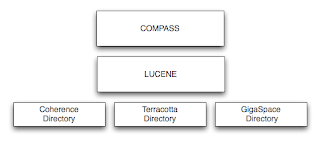
Moreover, Compass has sophisticated object-to-document mapping system which allows to make stored objects searchable just by addition of Java annotations or XML mapping files. Also mapping can be built in runtime.
However, inspite the great code, Composs has scarce documentation. It may take significant time to dive into the code and docs to get what you want. But results will overcome all your expectations. Search engines on top of data grids easily overcome any old-generation search technologies.
But there is a class of workloads producing high query loads onto IMDGs. Item catalogs (in retailing companies for example) are hit by diverse stream of multi-createria queries.Typically query you see likes :
give me cell phones with MP3 support, Java and in red color.
Fortunately, Compass framework allows to do such queries effectively. It allows to builds inverse indexes with Apache Lucene and store them in a grid. The capability originates in very modular design of Lucene framework. All index IO operations hidden by abstraction of FileDirectory.
For now Compass provides implementations for Coherence, GigaSpaces and Terracota introducing unprecedented ability to build a vertical search solution on top of In-Memory DataGrid.

Moreover, Compass has sophisticated object-to-document mapping system which allows to make stored objects searchable just by addition of Java annotations or XML mapping files. Also mapping can be built in runtime.
However, inspite the great code, Composs has scarce documentation. It may take significant time to dive into the code and docs to get what you want. But results will overcome all your expectations. Search engines on top of data grids easily overcome any old-generation search technologies.
Sunday, January 18, 2009
Ship It Review
Content of the book can be naturally divided into 3 parts:
- Code of Software Developer
- Advices about development tools and considerations
- Trace Bullet Development
I'll review each part independently.
Part dedicated to relations in developers team and management is absolutely brilliant. It gives wonderful inside to team dynamics, main factors influencing changes and intrateam relations. And most importantly it provides solutions for common problems of day-to-day developer’s life. No doubt, the chapter will be interesting for both newbies and seasoned team leaders.
Another part of the book is dedicated to development tools and processes. There is nothing novel here. In our days every developer knows Version Control System should present. And it would be better to have a continuous integration server if your team has more than 1 guy. So the part can be skipped if you have knowledge about modern development processes.
And the last part is dedicated to so-called Trace Bullet Development (TBD) process. While the wording sounds cool, usefulness of the process is rather arguable. Don't get me wrong; described design process (yes, this is not a Development process, this is a Software Design Process) will work. Creation of vertical of functioning system components is a good starting point for any project. But TBD pushes it forward too much. Interfaces created early tend to be error-prone. And after the interfaces were designed, they tend to become unchangeable. So line by line they become monsters which have no connection with the original elegant idea.
Concept of implementation of architecturally important user-stories or use-cases looks much better for me. Needless to say, as in any book there are several out-dated or even harmful advices. For example, "design all interfaces to be remote" . Such methodology used without appropriate care will make system too complex without real need.
Anyway, the book worth reading. This is the best masterpiece I’ve read since "The One Minute Manager".
- Code of Software Developer
- Advices about development tools and considerations
- Trace Bullet Development
I'll review each part independently.
Part dedicated to relations in developers team and management is absolutely brilliant. It gives wonderful inside to team dynamics, main factors influencing changes and intrateam relations. And most importantly it provides solutions for common problems of day-to-day developer’s life. No doubt, the chapter will be interesting for both newbies and seasoned team leaders.
Another part of the book is dedicated to development tools and processes. There is nothing novel here. In our days every developer knows Version Control System should present. And it would be better to have a continuous integration server if your team has more than 1 guy. So the part can be skipped if you have knowledge about modern development processes.
And the last part is dedicated to so-called Trace Bullet Development (TBD) process. While the wording sounds cool, usefulness of the process is rather arguable. Don't get me wrong; described design process (yes, this is not a Development process, this is a Software Design Process) will work. Creation of vertical of functioning system components is a good starting point for any project. But TBD pushes it forward too much. Interfaces created early tend to be error-prone. And after the interfaces were designed, they tend to become unchangeable. So line by line they become monsters which have no connection with the original elegant idea.
Concept of implementation of architecturally important user-stories or use-cases looks much better for me. Needless to say, as in any book there are several out-dated or even harmful advices. For example, "design all interfaces to be remote" . Such methodology used without appropriate care will make system too complex without real need.
Anyway, the book worth reading. This is the best masterpiece I’ve read since "The One Minute Manager".
Saturday, December 13, 2008
New Tasks feature in gMail
The new Tasks feature is gMail is awesome!!! I have waited for it so long. Now I can abandon all substitutes I had tried to use (without any success by the way).
I use gmail as my single access point to work items. Separate tasks management systems was really unnatural for me. And now I can use gmail to do all stuff I need day by day.
It is not very rich from feature set point of view, but usability is great as usual. Hopefully, additional features will appear soon. I'll be happy to have an external access to the task list and tabs for task list switching (google, do you hear me?). :)
I use gmail as my single access point to work items. Separate tasks management systems was really unnatural for me. And now I can use gmail to do all stuff I need day by day.
It is not very rich from feature set point of view, but usability is great as usual. Hopefully, additional features will appear soon. I'll be happy to have an external access to the task list and tabs for task list switching (google, do you hear me?). :)
Subscribe to:
Posts (Atom)